How to Build Your Own Agentic OS with Claude Code
How to Build Your Own Agentic OS with Claude Code
An agentic OS is worth building — but not because of the dashboard. The value isn't the fancy Jarvis interface or the glowing metrics. It's everything under the hood: skill architecture, loop engineering, memory, and state control. Nail those and you can point Claude Code at any problem you have. I've built mine on an Obsidian vault, and in this breakdown I'll show you all four levels — and why the first two are where 90% of the money is.
When most people look at an agentic OS — mine or an Obsidian-based one — they fall into one of two camps. Camp one sees the buttons, moving parts, and metrics you can't get in the Claude Code terminal and thinks "I need this." Camp two sees a web app and calls it smoke and mirrors. Both camps miss the point. What they're missing are the AI fundamentals working underneath that turn a good-looking web app into a customized weapon you can use against any problem — with Claude Code, Codex, or even a local model.
The whole thing breaks into four levels: skills + loop engineering (the backbone), memory + state (the second brain), the interface (customization), and distribution (sharing it with your team or clients). Let's go level by level.
What Are the Four Levels of an Agentic OS?
- Level 1 — Skills and loop engineering. You've codified everything you do in Claude Code into a skill or an automation.
- Level 2 — Memory and state control. Your OS has a coherent database or file structure it can draw on, and it can record past runs to improve future ones.
- Level 3 — Interface and UI. A custom visual wrapper — a web app or an Obsidian plugin — around everything you built in levels 1 and 2.
- Level 4 — Distribution. Turning your skills and automations into buttons or voice commands anyone on your team can press, no terminal required.
Levels one and two are where you make most of your money — roughly 90% of the value of any agentic OS. Once those are locked in, the visual stuff on top is the cherry, not the cake. You can run all of level one and two entirely inside the standard Claude Code terminal or the Codex CLI. This isn't really about building an OS — it's about skills the way you work with Claude Code on any project.
How Do You Build Level 1 (Skills and Loop Engineering)?
Level one has four sub-phases: workflow audit, skill creation, automation, and loop engineering.
Start with a workflow audit
Before you can create skills, you have to know what to create skills for. Skills are arguably the most powerful thing in Claude Code because they let you get a specific output — telling Claude to do a specific thing, in a specific way, for a specific result. But which specific outputs do you actually need day-to-day and week-to-week? It's an obvious question, and yet most people can't answer it. Even the ones who can haven't taken those manual workflows and turned them into skills.
Here's the mental model. For most people, the relationship with Claude Code stays a purely manual back-and-forth: open the terminal, tell it to do the same things over and over. The fix is to audit everything you do and codify it. Your work almost certainly splits into domains — for me that's research, content, community, agency, and sales — and under each domain are repeated tasks. On the content side alone: outlines for every project, hooks for videos, repurposing content, building carousels. Every one of those should be a skill.
There are three ways to run the audit at scale:
- Manual. You already know what you do. Run the task in Claude Code, confirm it works, then say "see how we just did that? Turn it into a skill" — using the
skill-creatorskill. The ideal path: validate the workflow manually first, then codify it. - Session mining. Claude Code has access to your previous sessions — it can see the tool calls and the full back-and-forth. Prompt it: "Go through our last 10 sessions, pull out repeated tasks that aren't skills yet, and make a chart showing the task, the expected output, and the proposed skill." This runs off real data instead of guesswork.
- The interview. Have Claude Code interview you. Give it a stream of consciousness about what you do each day and week, tell it to ask about blind spots, and have it pull out the tasks worth turning into skills.
The prompts don't need to be fancy. The whole idea is to throw as much context about your work into Claude Code as possible and codify it — the same way you'd onboard a new personal assistant by telling them what you do and giving step-by-step instructions. Most people just never do it.
Turn skills into automations
Once a task is a codified skill and it gets repeated, ask: why is this still manual? You can prompt Claude Code directly — "can we turn that skill into an automation?" — or set it up visually in the Claude desktop app under Routines: give it a name, set the instruction to "run this skill," and put it on a schedule.
Add loop engineering where it fits
Loop engineering is the third layer. Once you have the skill and the automation, the question becomes: do you want to add a self-improvement loop — something that looks at past runs and improves future ones? That ties directly into memory and state (level two). You don't need it for every automation, but laying the skill-and-automation foundation sets you up perfectly for it.
This is the backbone of everything: codifying your life so you get consistent outputs from Claude Code on the tasks you actually care about. It has nothing to do with dashboards, and it works entirely in the terminal.
How Should You Set Up Memory and State (Level 2)?
Level two is about giving Claude Code a map. I'll explain it through Obsidian because it's free and easy to understand, but none of this requires Obsidian. Everything Obsidian does can be done in a traditional database. Honestly, if you just set up Claude Code with a coherent file structure, you're 99% of the way there. Obsidian just makes it easy.
Connecting Claude Code to your vault
Obsidian is free. You download it, then designate a folder on your computer as the vault — a new folder or an existing one. To connect Claude Code, you literally just open Claude Code inside that folder. Navigate your terminal into the vault (I named mine the vault), launch Claude Code, and for all intents and purposes it's now connected to your vault. Whatever you designate as the vault should hold at least a copy of the data for the domains you want help with — sales data, research, content, whatever.
Why file structure is the whole game
This is not a trivial question. The value of Obsidian is that Claude Code can be opened inside a folder with thousands of files and subfolders, and you can ask it about any of them and get a fast, accurate answer. But if you dump ten million files into one folder with no hierarchy, no backlinks, and no structure, Claude struggles — and slow means more tokens, which means more money.
Your mental model is a map. When you ask Claude Code about something buried in that morass of files, it needs a clear path to the right file. Think of Obsidian as your filing cabinet for everything.
The Karpathy Obsidian setup
There's a common structure for this that comes from Andrej Karpathy — a tweet of his on the topic pulled over 20 million views. It goes like this:
/raw— where all unstructured data goes (research dumps, articles, source docs)./wiki— where you turn that unstructured data into structured data: a clean, Wikipedia-style article on the topic so everything you need is in one neat place instead of 20 source documents.- Outputs — where structured data becomes a deliverable: a slide deck, a report, something useful.
So the flow is unstructured → structured → outputs. That's the "Karpathy Obsidian RAG" — and I say RAG in air quotes, because it's a new kind of RAG.
But the real beauty isn't the three folders. It's the index.md file at every level. An index.md is just a markdown file that tells Claude Code what it's looking at each time it goes a level deeper. Ask your OS about AI agents, and the first thing it hits is the top-level index.md: "we have /raw for unstructured data, /wiki for structured, and outputs for deliverables." So it knows to go straight to the wiki article. Inside the wiki folder there's another index.md. With one article you don't need it — but with thousands of documents built up over a year or two, that table of contents is what lets Claude hit a folder and instantly know where to go.
The power comes from the map, not the arbitrary folders. You don't have to use /raw or /wiki or any of Karpathy's naming. You need a structure that makes sense, and it'll probably be unique to you because your data and goals are unique. If you don't know where to start, tell Claude Code: "Look at my vault — what structure makes sense? Use Karpathy's Obsidian RAG setup for inspiration."
Add a CLAUDE.md for the vault
The one thing I'd add: a CLAUDE.md file in your vault. Mine documents my vault conventions — the vault structure (I have far more than three folders: content, notes, runs, inbox, ops, projects, and more) and a navigation pattern that tells Claude the exact path to follow when it's trying to find something. That template is flexible enough to apply to any structure or data you're working with.
Memory and state also feed loop engineering. For a self-improving skill to work, Claude Code needs somewhere it can see what past runs did so it can make future improvements — and that logging should live in the same coherent place. Master levels one and two and you've got 90% of the power of an agentic OS, all through the terminal or desktop app.
How Do You Add a Custom Interface (Level 3)?
Level three puts a custom visual wrapper around everything so far. You've got two main options: a web app or an Obsidian plugin.
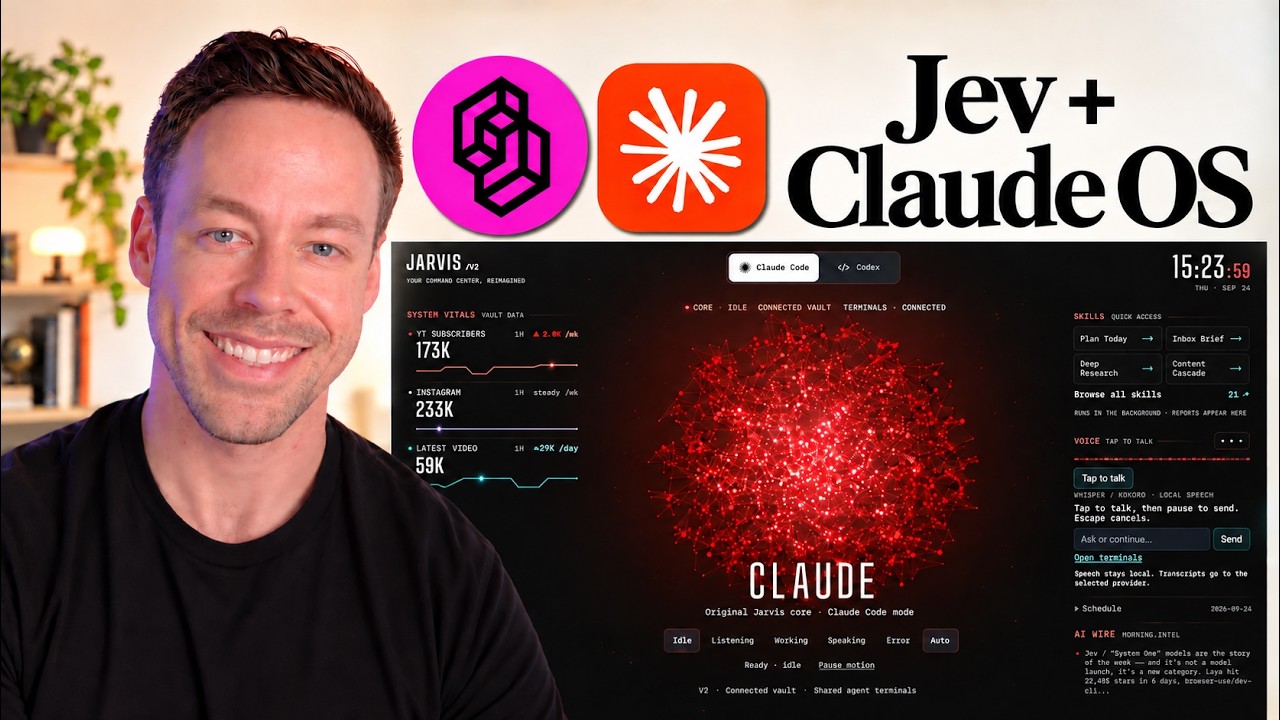
The web app is Claude Code under the hood, connected to Obsidian, with custom metrics tuned to what I need to see — YouTube subscriber count, Instagram, latest video, my Claude 5-hour window, directives pulled from Google Calendar. On the right side I've turned my automations and skills into single buttons. Click "inbox brief" and it queues, Claude runs through my inbox behind the scenes, drafts replies, and tells me what's important. I even have a local voice model attached — it talks back, and because it runs on my computer instead of going out to ElevenLabs, it's free.
You can build the same thing inside Obsidian as a command center — Obsidian runs a plugin system, so you're essentially building an app scoped to Obsidian. Building either is like building any web app with Claude Code: give it a visual reference (screenshot a setup you like), tell it "here are the skills I already use, connect this to the vault, here are the metrics I care about," and have it build the wrapper. Then tell it "now make an Obsidian plugin version of that," and it will.
What actually happens when you click a button?
Under the hood, clicking a button calls a headless version of Claude Code. It's as if you opened your terminal and ran /morning-brief — except the terminal never pops up. It's invisible, using a command called claude -p.
Quick note on the claude -p drama: Anthropic said at one point that claude -p wouldn't pull from your Claude subscription and would instead draw on a $200 API credit. They've since walked that back — for now it still pulls from your Max plan, same as running it in the terminal. That's how these structures call on Claude Code and get all the power, done invisibly behind the scenes.
How Do You Distribute Your Agentic OS (Level 4)?
The best part: your OS doesn't have to be just for you. You can hand it to teammates or clients as a floor-raising mechanism. Because all the power lives in the skills and automations, if you make those one click away, you've essentially spun someone up on Claude Code without spinning them up on Claude Code. They don't need to install a skill, learn to run it, or automate it — they press a button and it dumps the output into their Obsidian.
On distribution mechanics, the web app is much easier to hand off: it's web-based, so you can put it on GitHub, zip it, and it's simple to transfer and get running. Obsidian is a little harder — you'd have to set it up for them rather than saying "clone this repo and point Claude Code at it." Not much harder, just not as turnkey.
The customization is a huge selling point, especially for client work. The number of people who want to use AI but are scared off by the terminal — even the desktop app — is enormous. If you're watching this you might scoff, but 99% of people won't go there no matter what. Being able to say "here, I set it up for you, just talk to it or press a few buttons" goes a long way. The dashboard effect on a non-technical audience genuinely changes how people interpret these tools.
Frequently Asked Questions
Do I need Obsidian to build an agentic OS?
No. Obsidian is free and easy, which is why it's popular, but everything it does can be done in a traditional database. What actually matters is a coherent file structure — set Claude Code up inside a folder hierarchy that makes sense, with an index.md at each level, and you're most of the way there without any special tooling.
What's the most important part of an agentic OS?
Levels one and two — skills plus loop engineering, and memory plus state. They account for roughly 90% of the value. The interface and distribution layers are a cherry on top. If you only do one thing, run a workflow audit and turn your repeated Claude Code tasks into skills.
What is the Karpathy Obsidian setup?
It's a file structure popularized by Andrej Karpathy: a /raw folder for unstructured data, a /wiki folder for structured data (clean, article-style notes), and an outputs folder for finished deliverables — unstructured → structured → outputs. The real power is the index.md map at every level, not the specific folder names.
What does claude -p do in an agentic OS?
claude -p runs Claude Code headlessly — no terminal window appears. When you click a button in the interface, it's running a skill invisibly in the background via claude -p, the same way you'd run it in your terminal. As of now it still draws on your Max plan rather than separate API credits.
Can I share my agentic OS with my team or clients?
Yes — that's level four. Turn your skills and automations into buttons or voice commands so non-technical people get the power of Claude Code without touching the terminal. Web-app versions are easiest to distribute (GitHub, zip); Obsidian plugin versions take a bit more hands-on setup.
If you want to go deeper into building your own agentic OS, join the free Chase AI community for templates, prompts, and live breakdowns. And if you're serious about building with AI, check out the paid community, Chase AI+, for hands-on guidance on how to make money with AI.